Know why every customer cancelled.
Debrief interviews everyone who leaves, ranks what to build by the revenue that walked out, and emails them the day you ship the fix.
Free, 500 interviews a month · Sign in with email or GitHub · Stripe in 2 minutes
From goodbye to fixed, in one loop.
Exit surveys record a checkbox. Debrief records a conversation, turns it into a ranked roadmap, and closes the loop when you ship.
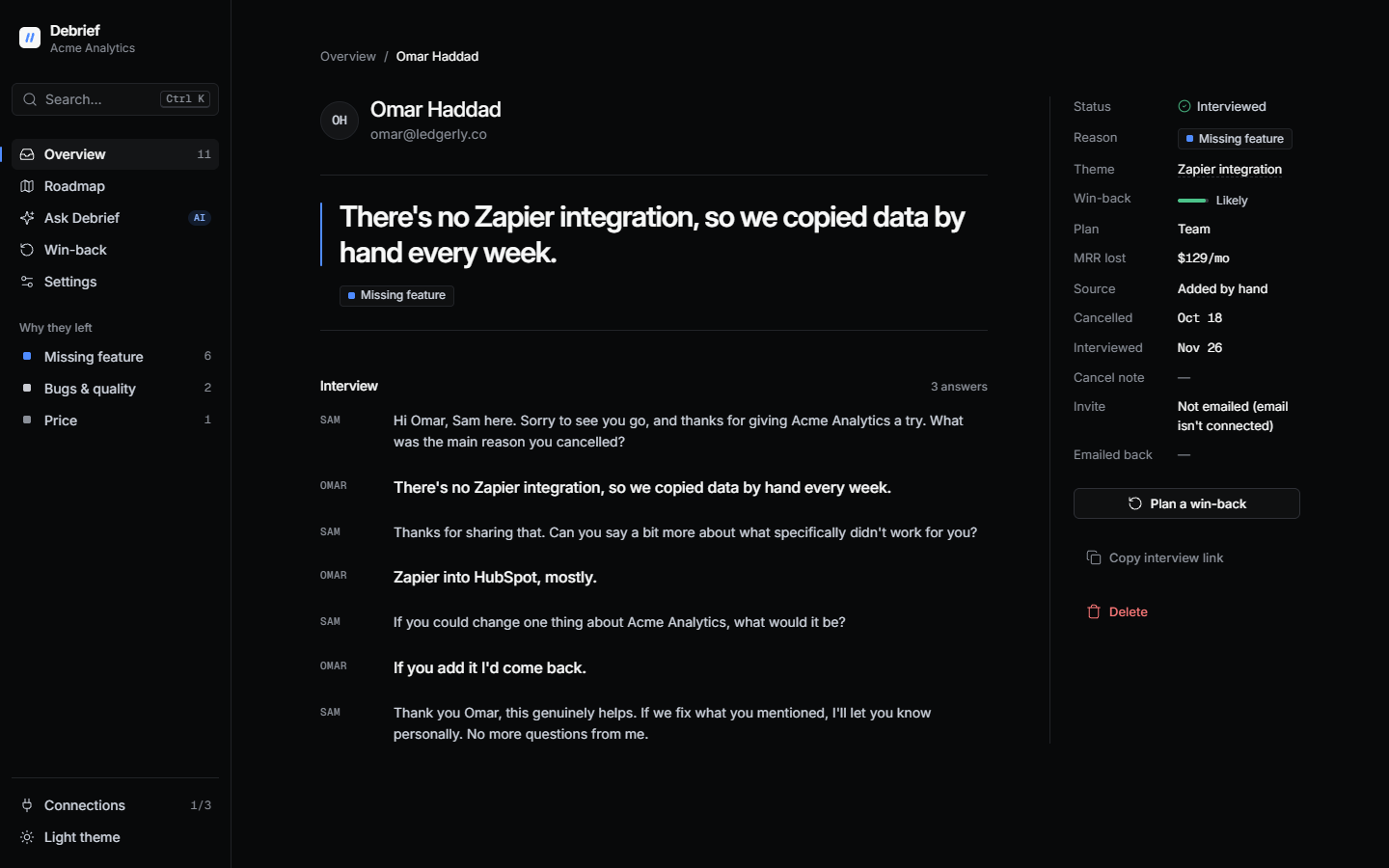
Their reason, their words, their odds of coming back.
Each cancellation gets a reason, the sentence that explains it, a roadmap theme, and a win-back likelihood estimate. The full transcript is one click away.
- Reason and quote picked out for you
- Invite delivery status, with one-click resend
- Delete a customer's data when they ask
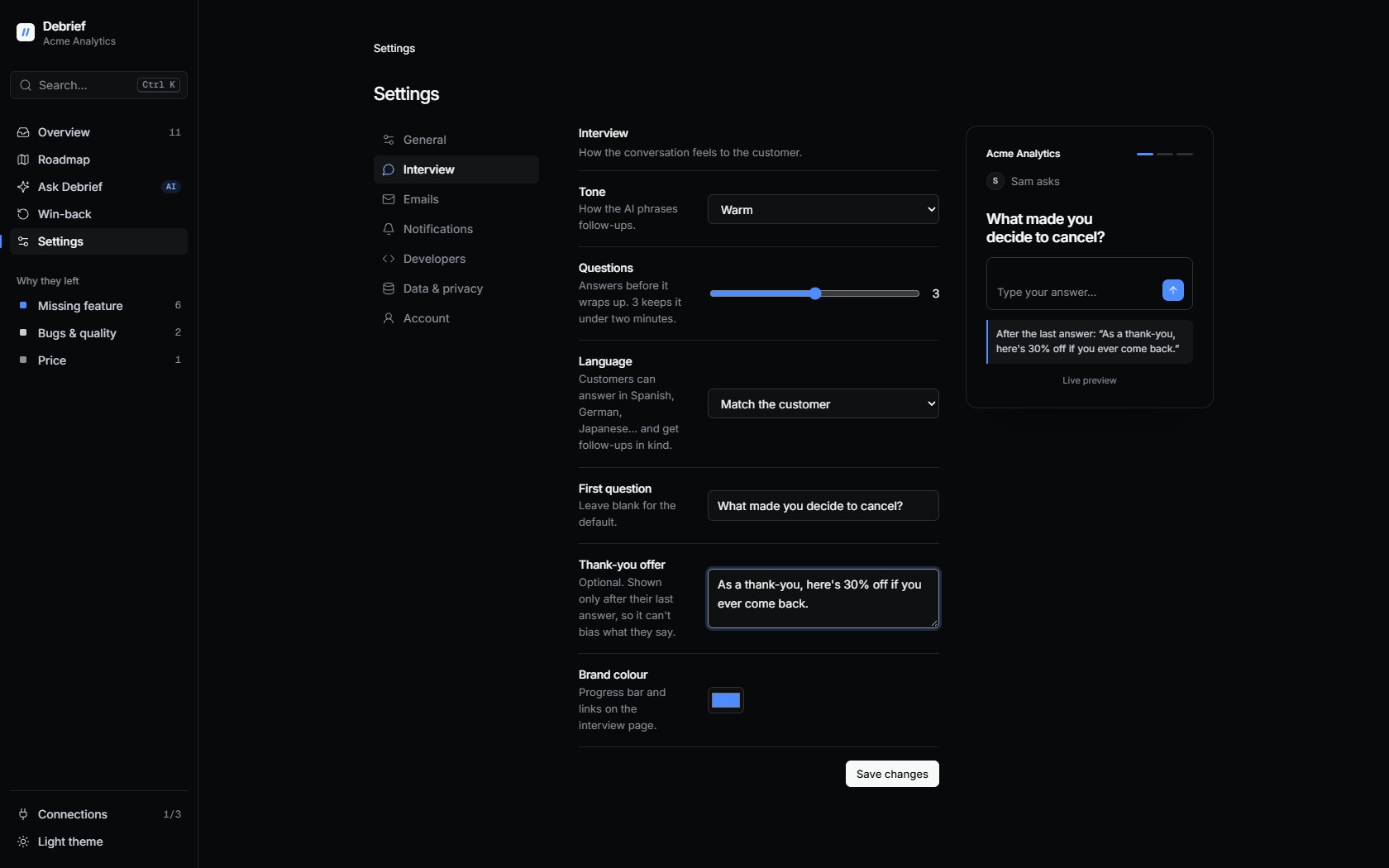
Sounds like you, in their language.
Pick the tone, the number of questions and the first question. Customers can answer in any language and the follow-ups match. Add a thank-you offer that only appears after they've answered.
- Warm, neutral or direct tone
- Your brand colour on the interview
- Live preview while you edit
Your churn, inside Claude.
Debrief ships an MCP server and a REST API. Ask your AI assistant "what should we build next?" and it answers from your real exit interviews.
Read the developer docs$ claude mcp add --transport http debrief \ https://exitdebrief.app/mcp \ --header "Authorization: Bearer dbk_…" > What should we build next? ● debrief · roadmap Zapier integration $307/mo 3 customers Google Sheets export $129/mo 1 customer Dashboard crashes $68/mo 2 customers
Hear it the moment they answer.
Each finished interview posts to Slack with the quote, or lands in your inbox. No dashboard to remember to check.
- Slack incoming webhook
- Email to the account owner
Omar Haddad (Team, $129/mo) finished their exit interview. Reason: missing feature · Zapier integration.
There's no Zapier integration, so we copied data by hand every week.Open in Debrief
What's walking out the door?
Move the sliders. Win-back rate is yours to set: the share of churned customers who return after hearing you fixed their reason.
It starts the moment someone cancels.
- Stripe tells Debrief when a subscription ends. Nothing to embed in your app.
- The customer gets a short note from you, linking to the interview.
- Answers are tagged, themed and ranked by revenue. Slack pings you with the quote.
- Ship the fix, mark it shipped, and tell everyone who left over it in one send.
Cancel flows fight the click. Debrief fixes the reason.
Retention pop-ups try to save a customer in the ten seconds before they leave. Debrief learns why they left, tells you what to build, and brings them back when it's done. Use both.
| Compared | Typical cancel-flow tool | Debrief |
|---|---|---|
| When it runs | At the cancel button | After the cancel, by email |
| Setup | Script in your app and a flow to design | Connect Stripe. Nothing to embed |
| What you learn | A dropdown choice | A conversation, in their words and language |
| What to build next | A chart of reasons | Themes ranked by revenue lost |
| Ask questions of it | Export and dig | Ask Debrief, with cited answers |
| Main move | Discounts and pauses | Fix the product, then tell them |
| Catches cancellations from | Your app only | Your app, billing portal, email requests |
Questions, answered.
Do I need to add code to my app?
No. Debrief listens to Stripe's subscription-cancelled event. You can also add cancellations by hand or share the interview link yourself.
Will customers actually answer?
The email comes from you, by name, and the interview is one question at a time and takes about two minutes. You can add a thank-you offer that only appears after they finish, so it can't bias their answers.
Does it work without AI?
Yes. Without an AI key, Debrief asks scripted follow-ups and tags reasons by keyword. With AI, follow-ups adapt to each answer and Ask Debrief writes full answers.
Can I use it alongside a cancel flow?
Yes. A cancel flow tries to save the click; Debrief learns from the customers who leave anyway. They answer different questions.
What about my customers' data?
Each workspace only sees its own rows. You can export everything as CSV, or delete a single customer or the whole workspace from Settings.